


PayMe - Claim Your Money
4.51.24K Reviews
App Specs
- Version
- 4.7
- Updated On
- License
- Free
- Downloads
- 500,000+
- Developer
- Prove It
- Categories
- Finance
- Platform
- Android
Screenshots
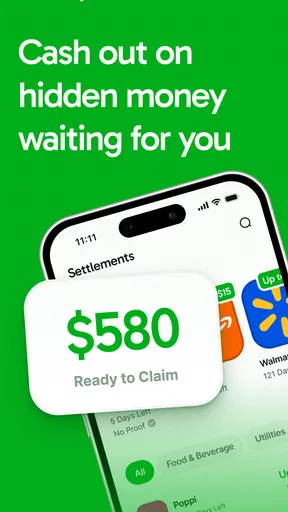


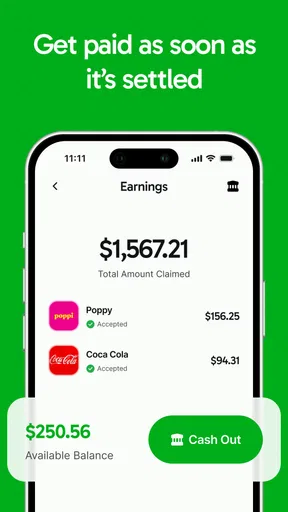
 Analysis by AppCompare
I judge a finance app first by whether I can understand what it is asking me to do, especially when money and personal information are involved. PayMe - Claim Your Money has a narrower purpose than a budgeting or banking app: it is meant to help people pursue money connected to company settlements. That distinction matters. I would approach it as a tool for checking a possible claim, not as a place to manage everyday spending or as a promise that money is waiting for me.
Clarity matters more than a busy dashboard
For this kind of task, good navigation means being able to tell what a claim concerns, what action is expected, and what information is needed before taking the next step. I would look for plain explanations rather than skim through legal or financial language and guess. The app is free to install, and its finance focus makes the intended job easy to identify; its developer is Prove It. Its average rating is 4.7 from around 15,000 ratings, with over 100,000 installs, so there is a meaningful amount of public interest—but popularity cannot tell me whether a particular settlement applies to me.
My practical approach would be to treat every claim as a small decision, not a tap-through chore. First, identify the company and the issue being described. Then compare that information with my own history, such as whether I used the relevant product or service during the period that matters. Before sharing details, I would read the explanation of why they are needed and make sure I am comfortable proceeding. This slow first pass is useful because a simple-looking claim process can still involve important eligibility conditions.
Readability and navigation in real situations
A settlement app is most useful when it turns a confusing notice into understandable next steps. I would want to be able to pause, return to the explanation, and distinguish a general alert from a claim that actually fits my circumstances. That is especially important for people who read more slowly, are unfamiliar with legal terms, or prefer to check information with someone they trust before acting.
In everyday use, I would avoid trying to review a claim while rushing between errands. A calmer workflow is to open the details when I have time, note any eligibility conditions, and gather relevant records separately before deciding whether to continue. That reduces the chance of mixing up companies or assuming that a familiar brand automatically means I qualify. If I am helping a relative, I would let them review the terms and make the decision themselves rather than treating the app as permission to submit information on their behalf.
Motor and sensory considerations
Claim work can involve reading, tapping, and entering personal information, so the experience is not only about visual design. Someone using a phone one-handed, dealing with hand fatigue, or relying on a screen reader may need more time and a low-pressure setting. I would take care not to rush through forms, and I would check each entry before moving on, particularly when correcting a mistake could mean restarting a step.
Notifications deserve a little thought, too. A reminder can be helpful if I am managing a claim, but repeated or poorly timed alerts can become noise. I would keep only the notifications that help me act and review the phone’s own accessibility and display settings if text or contrast is uncomfortable. Those device settings may improve general readability, though they cannot guarantee that every screen in a third-party app will suit every need.
Worth Reading Before You Choose

EA SPORTS FC Mobile 26 Is a Bigger Football Game, but It Takes Time

Flipboard Shows What News Apps Must Do Beyond the Feed

Switching to Android Auto Means Rethinking Your Driving Routine

Google Calendar Makes a Crowded Week Easier to Manage

Ludo King Makes the Most of the Minutes Between Plans

Baby Panda World Brings Quick Play to Modern Phones, but Its Game Library Feels Busy
Using PayMe with care
I use this section to think through the moment when a claim moves from something I am merely browsing to a decision involving my information. Before continuing, I would make sure I can explain the claim’s basic conditions in my own words and know which official materials I can consult if anything remains unclear. That kind of pause helps keep convenience from turning into pressure.
Situational access and sensible alternatives
The app may be convenient when I hear about a settlement away from home and want to investigate it later, but convenience should not replace careful verification. For example, imagine a friend mentions that customers of a company may be eligible for a settlement while we are having coffee. I would make a note of the company, open the relevant information when I have a quiet moment, and compare the conditions with my own experience. If the wording is unclear, I would check the official settlement administrator’s materials before submitting anything.
This is where PayMe differs from familiar finance apps. A budget tracker helps organize income and spending; a payment app moves money between people; a bank app shows accounts and transactions. None of those jobs is the same as identifying and pursuing a settlement claim. If I only need to split dinner or track a shared trip, I would choose an expense-splitting tool instead. If I need authoritative details about a legal claim, I would use the official settlement channel as the final reference rather than rely on a discovery app alone.
Where friction can remain
The app is free, but optional in-app purchases range from $4.99 to $299.99 per item, so I would check what a purchase covers before paying and never assume payment is required to make a valid claim. The age rating is Everyone, but that does not mean every claim is appropriate for every person; the relevant eligibility rules still control. The current version is 2.5, and the minimum operating-system requirement is 7.0. Those details are worth checking against an older device before relying on it.
There is also a broader accessibility trade-off: even a readable app cannot make a complicated settlement simple if the underlying rules are difficult. A small screen, glare, interruptions, limited data access, or difficulty entering long details can make a claim harder to complete. I would save time for the task, use a larger screen if that is more comfortable, and ask a trusted person to help interpret wording without handing over control of my account or personal choices.
Who should use it—and who should pause
I see the strongest fit for people who want a convenient starting point for checking whether a company settlement might concern them, especially if they do not routinely follow legal notices. A useful habit is to keep a short note of companies and services I have used, then compare that history with each claim’s stated conditions. That is more reliable than relying on memory alone, and it helps me avoid spending time on claims that clearly do not match my experience.
I would pause if I cannot tell who is requesting my information, why it is needed, or what happens after submission. I would also avoid treating an app notification as proof of eligibility or a guaranteed payout. Someone who wants a complete household budget, direct control of bank accounts, or a simple way to settle a shared bill should look at a tool built for that job. PayMe’s value is in claim discovery; expecting it to replace a bank, lawyer, or official administrator would set the wrong expectations.
An inclusive verdict
Released on September 24, 2025, PayMe is a free finance app for a specific and often overlooked task: finding a path to claim money tied to company conduct. I like that the purpose is easy to distinguish from ordinary banking, but I would still judge each claim on its own terms and verify important details through the official channel. The app is best used as a starting point, with enough time and attention to read before acting.
My recommendation is conditional: it is worth considering if you want to investigate possible settlement claims and can comfortably review the information on your device. It is less suitable if you need broad money management, have difficulty using the interface without support, or want a guaranteed result. For readers who need larger text, more time, or help understanding a claim, the sensible move is to adjust the phone, work through one step at a time, and involve a trusted person only in a way that preserves the claimant’s control. That balance makes the app potentially useful without asking it to do more than its role.
Getting Started with PayMe
First things first, you’ll want to download PayMe from the app store. It's available on both Android and iOS, so no one's left out. Once installed, the setup is pretty straightforward. You just need to sign up with your email or connect it to your social media account, and you’re good to go. The interface is clean and intuitive, which means even if you’re not a tech wizard, you’ll get the hang of it in no time.
Features Galore
Alright, let’s dive into the juicy stuff—features! PayMe isn’t just about tracking who owes you money; it’s packed with features that make managing shared expenses a breeze. You can create groups for different activities, like splitting rent with your roommates or sharing costs for a road trip. Each group allows you to add expenses and specify who paid and who owes what. It's like having a financial assistant in your pocket.
One feature that I found particularly nifty is the ability to send reminders. We all have that one friend who "forgets" to pay up. With PayMe, you can shoot them a gentle nudge without feeling awkward. Plus, you can link your bank account or PayPal, making it super easy to settle debts directly through the app.
User Experience
Now, let's talk about how it feels to use the app. The design is sleek and modern, with a user-friendly layout. Everything is where you expect it to be, and the navigation is as smooth as butter. The app runs fast, with no noticeable lags, which is a huge plus when you’re trying to settle things quickly.
One little hiccup I noticed is that the app could use better notifications. Sometimes, updates or reminders can get lost in the shuffle, but it’s nothing a quick settings tweak can’t fix.
Security and Privacy
In today’s digital age, security is a big deal. Thankfully, PayMe takes this seriously. The app uses encryption to keep your data safe and sound, and there are options for two-factor authentication for that extra layer of security. You can rest easy knowing your financial information isn’t going to fall into the wrong hands.
Final Thoughts
Overall, PayMe - Claim Your Money is a solid app for anyone looking to keep their finances in check. It's packed with features that simplify the process of managing shared expenses, and the user experience is top-notch. While it has a few minor areas for improvement, the pros definitely outweigh the cons.
If you’re someone who frequently shares expenses with friends or family, give PayMe a shot. It’s like having a personal accountant, minus the hefty fees. So, next time you’re out with friends, rest easy knowing that PayMe has got your back. Happy tracking!
Pros
- User-friendly interface with easy navigation.
- Quick setup and seamless bank integration.
- Real-time notifications for transactions.
- Supports multiple currencies and languages.
- Secure encryption for safe transactions.
Cons
- Limited customer support availability.
- Transaction fees can be high.
- Occasional app crashes reported.
- Lacks offline mode functionality.
- No option for recurring transactions.
FAQs for PayMe - Claim Your Money
What is PayMe - Claim Your Money and how does it work?
PayMe - Claim Your Money is a financial app designed to simplify the process of requesting and receiving payments. Users can send payment requests to friends, family, or clients, who can then settle the amount through various integrated payment methods. The app aims to make transactions seamless and secure.
Is PayMe - Claim Your Money secure to use for financial transactions?
Yes, PayMe - Claim Your Money prioritizes user security by employing advanced encryption techniques and secure payment gateways. The app ensures that all transactions are protected, and it adheres to industry standards for data protection and privacy. Users can confidently manage their finances without worrying about security breaches.
Are there any fees associated with using PayMe - Claim Your Money?
PayMe - Claim Your Money is free to download and use for basic features. However, some premium services or certain types of transactions might incur fees. It's important to review the app's pricing details or terms of service to understand any potential costs associated with advanced features or transactions.
Can I use PayMe - Claim Your Money internationally?
Yes, PayMe - Claim Your Money supports international transactions, allowing users to send and receive payments across different countries. However, users should be aware of possible currency conversion fees or restrictions depending on the regions involved. Checking the app’s international features can ensure smooth cross-border payments.
What platforms is PayMe - Claim Your Money available on?
PayMe - Claim Your Money is available for both Android and iOS devices. Users can download the app from the Google Play Store or the Apple App Store. It is designed to work seamlessly on smartphones and tablets, providing a consistent experience across different devices.


